A payment gateway is the secure connection that collects a customer’s card details on your checkout and sends them off for approval. A merchant account is the account that lets your business accept card payments and receive the money from approved sales. An online-only business needs both for every sale, but you can get them in one sign-up or from two separate companies, and that choice affects how you are reviewed, what you can change, who you call when something breaks and how easily you can move later. This guide explains what each piece does, the three common ways to put them together and the questions that help you pick.
The short answer
- They do different jobs. The gateway captures and transmits the payment. The merchant account holds and settles the approved money before it reaches your business bank account.
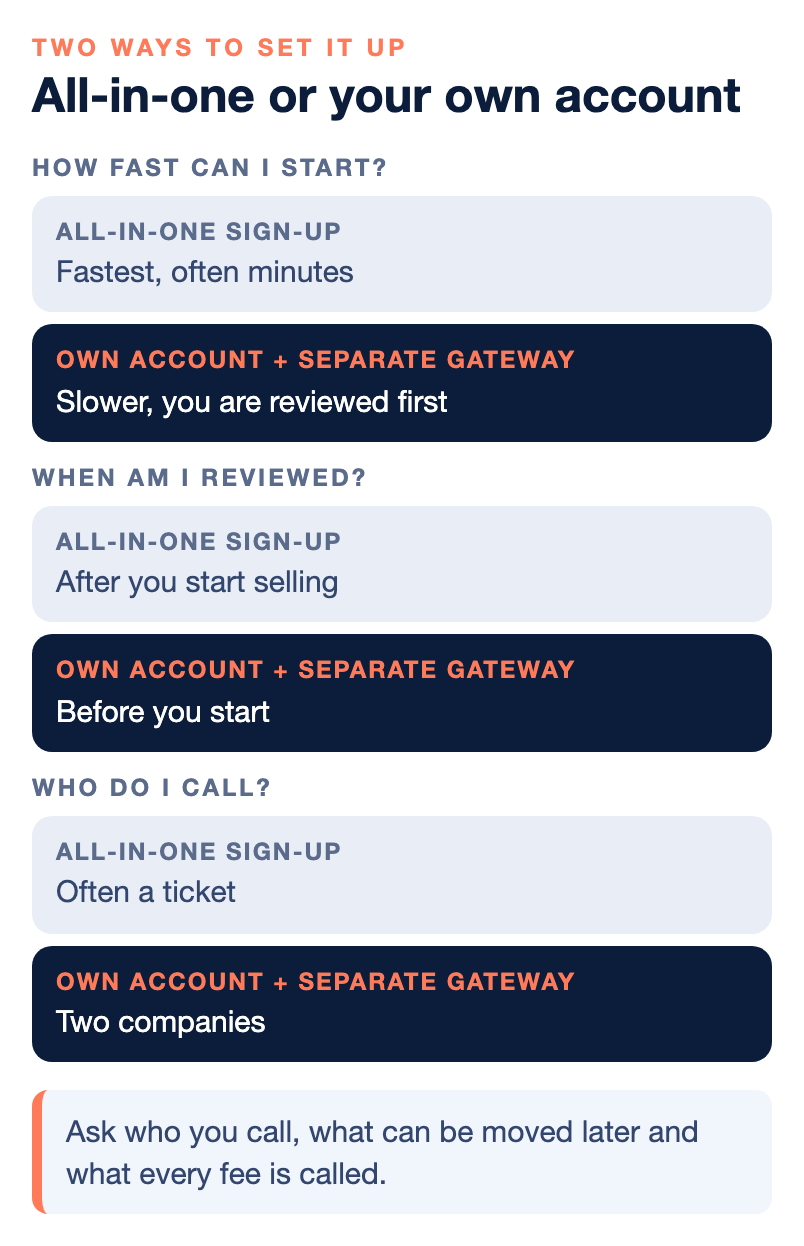
- Many starter services bundle both. That makes sign-up fast, and the review usually happens after you begin selling.
- A dedicated merchant account is reviewed up front. It takes longer to open, and you get your own account standing and more say over pricing and settings.
- You may need a separate gateway if you use a custom website, your own merchant account, subscriptions or multiple currencies.
- The choice is about control and support, not only price. Ask who you call, what can be moved later and what every fee is called.
What each piece does
Three terms get mixed up constantly, so here they are one at a time.
The payment gateway is the digital doorway on your checkout. It encrypts the card details and passes them along securely. It is also where many fraud settings live, such as address checks, security code checks and limits on repeated attempts.
The payment processor is the company that routes the transaction between your gateway, the acquiring bank (the bank that signs up merchants), the card network and the bank that issued the customer’s card.
The merchant account is the specialized account that holds funds from approved card transactions before they are deposited into your regular business bank account. It is what makes it possible to accept cards at all.
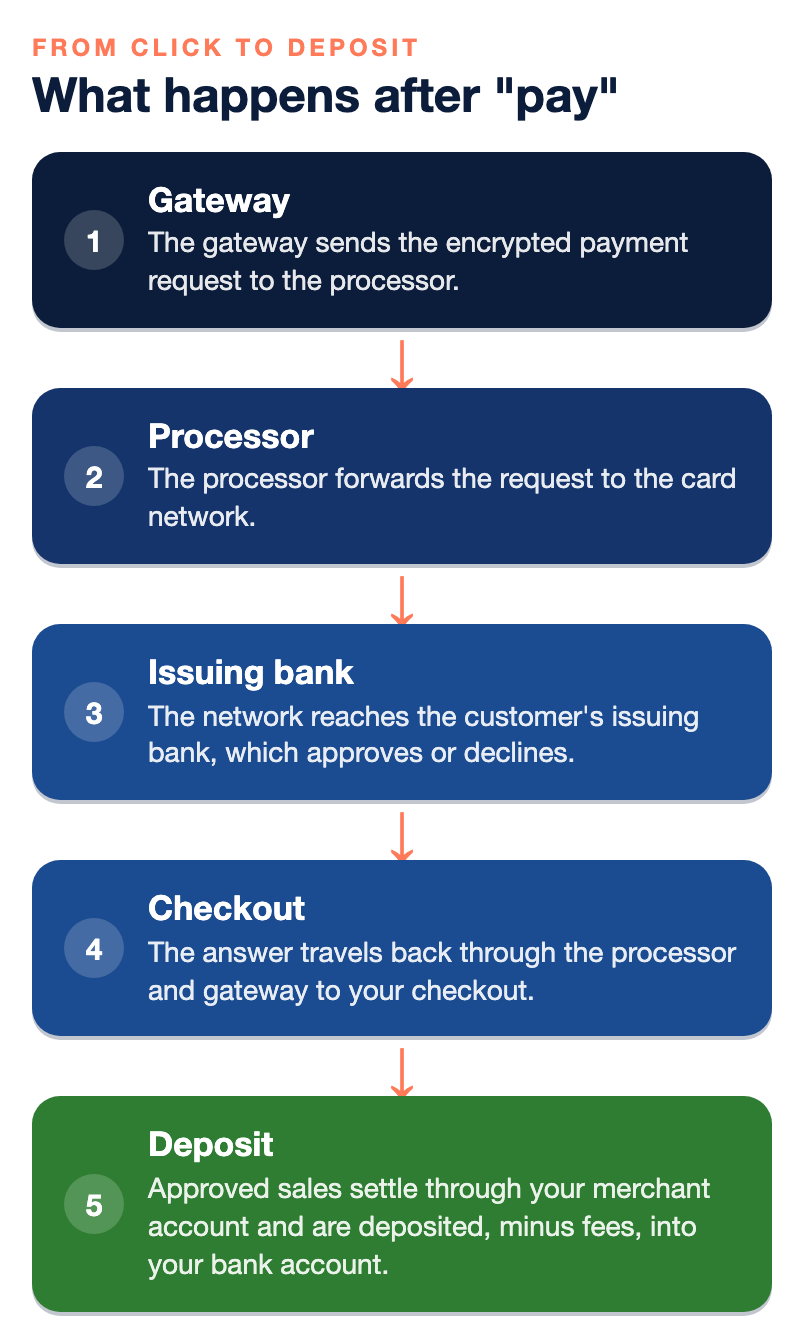
Here is what happens in the few seconds after a customer clicks “pay”:
- The gateway sends the encrypted payment request to the processor.
- The processor forwards the request to the card network.
- The network reaches the customer’s issuing bank, which approves or declines.
- The answer travels back through the processor and gateway to your checkout.
- Approved sales settle through your merchant account and are deposited, minus fees, into your bank account. NPS says most processors deposit within one to two business days.
For a plain walk-through of how those parts work together for a home-based seller, including what a home address changes, read What Is E-Commerce Payment Processing for a Home-Based Small Business? This guide does not repeat it. It focuses on the decision: which way to assemble the pieces.
Three ways to set it up
Option 1: One all-in-one sign-up
Some providers bundle the checkout, the gateway and the merchant account into a single online sign-up. You open an account, start selling in minutes and share an account structure with many other small sellers. Many app-based processors work this way as aggregators, which means you board under their master account instead of having your own.
The strength is speed and simplicity. The tradeoff shows up when there is a problem. Risk decisions can be automated, escalation paths can be limited, and support may be ticket-based only. Because the provider reviews you after you start, an account can be paused or closed later if something looks unusual, and a delayed deposit is then something you wait out, often without a person to call.
Option 2: Your own merchant account plus a separate gateway
Here you apply for a dedicated merchant account and connect a gateway to it, often chosen for the features your website needs. Your business is reviewed before you start. That takes longer to open, but it gives you more control over pricing and settings and a clearer path to a person if something needs attention. According to NPS’s beginner guide, a dedicated account can also bring better reporting tools and more control over fraud protection, with the potential for lower fees as you grow.
The tradeoff is more moving parts. NPS says many businesses unknowingly build a “Frankenstein system,” with one provider for the merchant account, another for the gateway, another for ACH, another for invoicing and another for accounting sync. Those setups can work. The cost is support confusion, mismatched data and reconciliation errors, so know in advance who answers when a payment fails.
Option 3: A merchant account and gateway from one provider
A third route is a dedicated merchant account where the same company also supplies the gateway, along with extras such as ACH, payment links and invoicing. You keep the up-front review and your own account standing, and you have one company to call. NPS offers this kind of setup, so keep in mind that we are one of the options.
Side by side
| Question | All-in-one sign-up | Own account + separate gateway | Own account + same provider’s gateway |
|---|---|---|---|
| Speed to start | Fastest, often minutes | Slower, you are reviewed first | Slower, you are reviewed first |
| When you are reviewed | After you start selling | Before you start | Before you start |
| Your own account standing | Usually a shared structure | Yes | Yes |
| Control over pricing and settings | Limited | More | More |
| Who you call | Often a ticket | Two companies | One company |
| Often suited to | Very small or new sellers | Custom sites and special features | Growing sellers who want one point of contact |
None of the three is wrong. The point is to choose on purpose, and to know before you sign which one you are getting.
When you need a separate gateway
Some starter services include a gateway, and some banks require a separate one. According to NPS’s beginner guide, you might need a separate gateway if you:
- Run a custom website instead of a ready-made store.
- Want to use your own merchant account.
- Need features such as subscriptions or multi-currency support.
If none of those apply and you are selling from a store platform that your provider supports, a bundled setup may be all you need. If you do need to choose a gateway, compare these items:
- Security: encryption and tokenization, which stores a stand-in token instead of the card number.
- Integration: how it connects to your site or store platform.
- Fees: the balance of per-transaction costs and monthly fees.
- Payment methods: cards, digital wallets and alternatives, in one dashboard.
- Reporting: sales, disputes and chargebacks in one place.
How a gateway connects to your site
There are three common ways, and they trade control against effort.
| Type | What it is | Main benefit |
|---|---|---|
| API integration | Your developer connects directly to the gateway | Full control over look and flow inside your site |
| Plugin or module | A pre-built connector for your store platform | Fast setup |
| Hosted checkout | The gateway shows its own secure payment page | Card details never touch your server, which reduces your PCI scope |
PCI DSS is the security standard for protecting cardholder data, and as a business that accepts cards you have responsibilities under it even when a provider does the processing. A hosted page is often the lightest way to meet them. Ask any provider what PCI tools it supplies and whether it charges a PCI fee.
What each piece costs
Every card sale carries interchange, which is set by the card networks and paid to the bank that issued the card, plus network assessments and your provider’s markup. On top of that, a gateway often adds its own charges. Monthly fees can include statement fees, gateway fees, PCI fees and software fees, and there may be a per-transaction fee. Low teaser rates sometimes hide a gateway markup, so ask for every fee by name.
Two points are specific to selling online. First, payments where the card is not physically present generally fall into higher interchange categories than chip payments in a store, because they carry more fraud risk. Second, a flat-rate plan with no monthly fee can be a sensible start for a very small seller, but it does not always mean a lower total cost. As volume grows, it can cost more than a dedicated account with interchange-plus pricing. The way to compare is the effective rate, which is your total fees divided by your total sales. Our guides on transparent merchant pricing and why your effective rate is higher than your quote show how, and Flat-Rate vs. Cost-Plus Payment Processing compares the two models.
Why the choice matters more online
An online-only business has no counter, no signature and no chip reader. That puts more weight on the pieces you do control.
- Fraud settings. Address and security code checks and limits on repeated attempts sit in the gateway. Ask how much you can adjust them yourself. Our guide on fraud screening vs customer friction covers the balance.
- Chargebacks. Keep tracking numbers, delivery confirmations, receipts and your refund policy, since they are the evidence you will need. Read our chargeback survival guide for how disputes work.
- Your website. Underwriters look at it. NPS lists refund, return, cancellation, privacy and shipping policies as the ones to make easy to find.
- Funding and holds. Fast approval does not always mean fast access to your money. Ask what triggers a hold or a reserve.
If you sell something many banks treat as higher risk, say so at the start. Our page on high-risk merchant services explains how that works.
Match the setup to how you sell
These pairings are starting points, not rules. Confirm every detail with the providers you are considering.
- An online store on a store platform. Ask which platforms the provider supports and whether it has a plugin. A plugin is the fast route, and a hosted checkout keeps card data off your site.
- A custom-built site. You will likely need API access or a hosted page. This is where a separate gateway most often comes in.
- Services sold by link or invoice. You may not need a full online store. Payment links and invoices open a secure payment page with no website required. See Payment Links and Invoicing and our comparison of a card machine, POS system and virtual terminal.
- Subscriptions and memberships. Look for recurring billing tools and clear cancellation terms. Failed payments need attention too, as we explain in Subscription Billing and Failed Payments.
- Business customers. ACH usually costs less than cards and suits large invoices. Our guide to the best B2B payment gateway covers what to look for.
Questions to ask before you choose
- Is the gateway included, or is it a separate product with its own fees and contract?
- Will I have my own merchant account, or share a master account?
- When are you reviewing my business, before or after I start selling?
- What is the full list of fees, including gateway, monthly, PCI, chargeback and early termination fees?
- Does it connect to my website, store platform and accounting software?
- Who do I call if a payment fails or my funds are held, and is there a phone number?
- If I leave, can I move my gateway, and what happens to stored card tokens and recurring billing?
- Are any of my products or sales channels restricted under your program?
The fifth, sixth and seventh answers tell you the most. NPS’s own list in 12 Questions to Ask Your Credit Card Processor Before Opening a Merchant Account goes deeper, and our overview of processor types and the beginner’s guide to accepting payments online are good companions.
Starting small and moving later
You do not have to pick the final setup on day one. A very small seller can start with a bundled service and compare a dedicated merchant account once volume grows. The main thing is to plan the exit before you need it, so ask about moving your gateway and your stored tokens at the start.
Some businesses also run more than one processor, for backup, to separate online and in-person sales, or to split risk. NPS notes the cost: reporting, reconciliation and accounting get harder, so keep a clear system for tracking deposits, fees, refunds and chargebacks.
Common mistakes
- Thinking the gateway and merchant account are the same thing. Either can have its own fees and its own contract.
- Clicking “I agree” on an online sign-up without reading the terms. Restricted-business lists, reserve rights and termination terms sit in the fine print.
- Choosing only on the advertised rate. Ask for the effective rate on your own volume.
- Using a personal bank account. Keep a separate business account for deposits.
- Skipping a checkout test. Make test payments on a phone, tablet and computer and confirm the money lands in your dashboard.
Who wrote this, and where NPS fits
Nationwide Payment Systems publishes this guide. We are a payments company based in South Florida, in business since 2001, and we sell merchant accounts and a gateway, so we are not neutral. We work with e-commerce businesses of many sizes and offer card processing, ACH, payment links, smart invoicing and a free WooCommerce plugin, with live U.S.-based support. We do not publish one universal rate, because pricing depends on volume, ticket size, card mix and risk. Browse our payments guides for more.
We are not the right fit for everyone. If you are a hobby seller with very low volume, if you only want an instant self-service sign-up, if you do not want to provide underwriting documents, or if the lowest advertised flat rate is the only thing that matters to you, a simpler platform will probably suit you better.
Bottom line
The gateway sends the payment and the merchant account settles it. An all-in-one sign-up is quick and suits many very small sellers, but you are reviewed after you start and support may be a ticket. A dedicated merchant account takes longer, is reviewed up front and gives you more control and a clearer path to a person, with or without a separate gateway. Pick on purpose, ask for every fee in writing and plan how you would move later. If you would like a second opinion on a setup or a quote, you can contact our team, and if another setup fits you better, we will say so.
Frequently asked questions
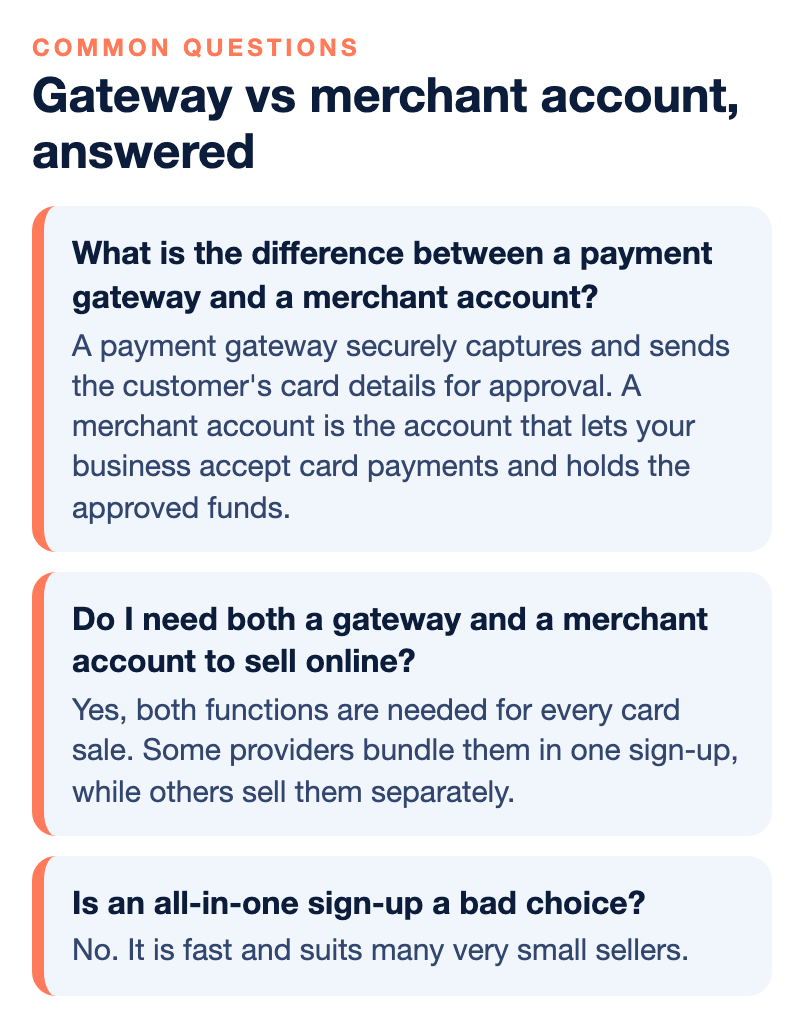
What is the difference between a payment gateway and a merchant account?
A payment gateway securely captures and sends the customer’s card details for approval. A merchant account is the account that lets your business accept card payments and holds the approved funds before they are deposited into your business bank account. An online sale uses both.
Do I need both a gateway and a merchant account to sell online?
Yes, both functions are needed for every card sale. Some providers bundle them in one sign-up, while others sell them separately. Whether you need to buy a separate gateway depends on how you sell and whom you use for your merchant account.
When do I need a separate payment gateway?
You might need one if you run a custom website, want to use your own merchant account, or need features such as subscriptions or multi-currency support. If your provider already supports your store platform with a built-in checkout, a bundled setup may be enough.
Is an all-in-one sign-up a bad choice?
No. It is fast and suits many very small sellers. The tradeoff is that the review usually happens after you start selling, risk decisions can be automated, and support may be ticket-based, so an account can be paused or closed later and you may have no person to call.
What does a dedicated merchant account give an online business?
It is reviewed before you start, so it takes longer to open. In return you get your own account standing, more control over pricing and settings, and a clearer path to a person when something needs attention.
Why do online payments often cost more than in-person ones?
Payments where the card is not physically present generally fall into higher interchange categories than chip payments in a store, because they carry more fraud risk. Compare providers by effective rate, which is total fees divided by total sales.
Can I switch gateways or processors later?
Often yes, but ask before you sign. Find out whether you can move your gateway, what happens to stored card tokens and recurring billing, and whether there is an early termination fee or an equipment lease.