A payment link is a secure web address you send to a customer by email, text or QR code so they can pay you on a hosted payment page, with a card or by bank transfer, without calling you with a card number. When the customer pays, the payment travels the same road as any online card or ACH payment: it is approved, grouped into a batch, settled and deposited to your bank. The link changes how you ask for money, not how the money moves. This guide explains how a link works, how it settles, how it differs from an invoice and a virtual terminal, and which risks to watch before you rely on one.
The short answer
- A link is a request, not a payment method. It points the customer to a secure page where they choose to pay by card, ACH or a digital wallet, depending on what you enable.
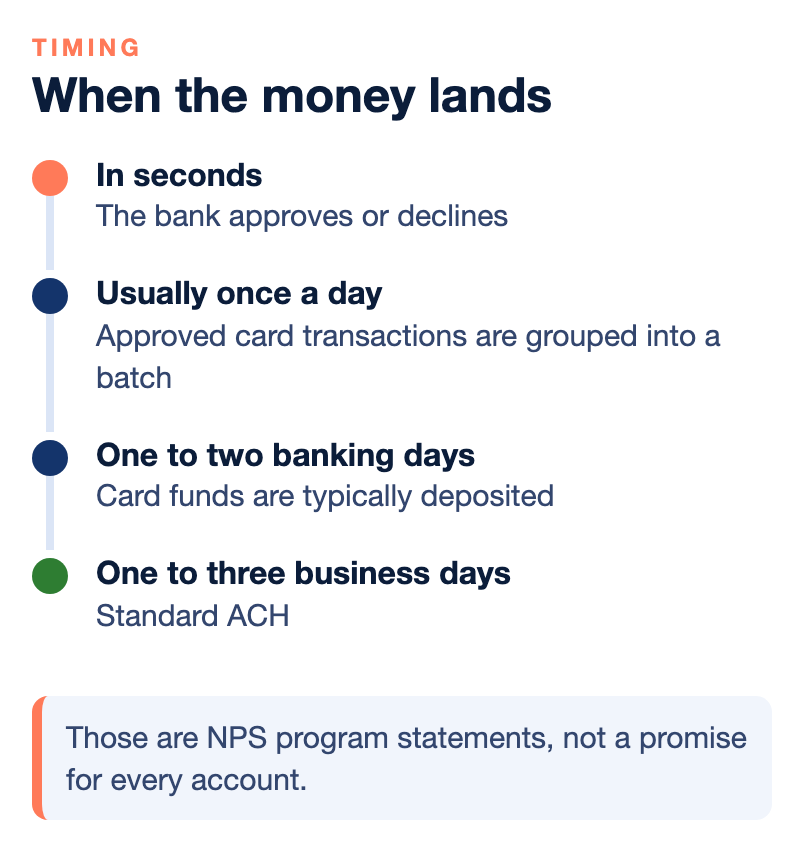
- Settlement is the same as any other payment. Cards typically deposit in one to two banking days at NPS. Standard ACH takes one to three business days, and same-day ACH is available in many cases.
- An invoice is a link plus a record. Invoicing adds the amount owed, due dates, reminders, partial payments and a trail that connects to your books.
- The risks are ordinary payment risks in a new place. Disputes on card-not-present sales, reconciliation errors, fee surprises, holds after a sudden jump in volume and, on open forms, card testing.
- Ask how it is priced, how it settles and what controls exist before you send the first one.
What a payment link is
A payment link is a way to take a payment without being in the same room as the customer. You create a request for a set amount, and the system gives you a secure web address. You send it by email or text, or print it as a QR code on an invoice or a flyer. The customer opens it on a phone or computer and lands on a payment page that carries your logo and name. Nationwide Payment Systems (NPS) describes its payment requests as secure and trackable.
The payment page is hosted by the payment system, not by you. That matters for security. NPS says its invoicing platform uses tokenization, which means a card number is replaced by a stored placeholder that is useless on its own, and that sensitive card data is never stored on or visible to the merchant. The customer enters the card or bank details on the hosted page, and you see the result of the payment, not the number.
A link can ask for a fixed amount, such as an invoice. It can also carry options: partial payments, a tip where it applies, a choice between card and ACH and, where your rules allow it, a convenience fee. NPS says convenience fees can be set by percentage or flat amount, and it notes that you should always check state and card brand rules for compliance.
Where a link sits next to a gateway and a virtual terminal
Three terms get mixed up, so here is the short version in plain words.
- A payment gateway is the service that encrypts a customer’s payment details and sends them to the processor. A payment processor moves the money. Some platforms include both, and some processors need a separate gateway.
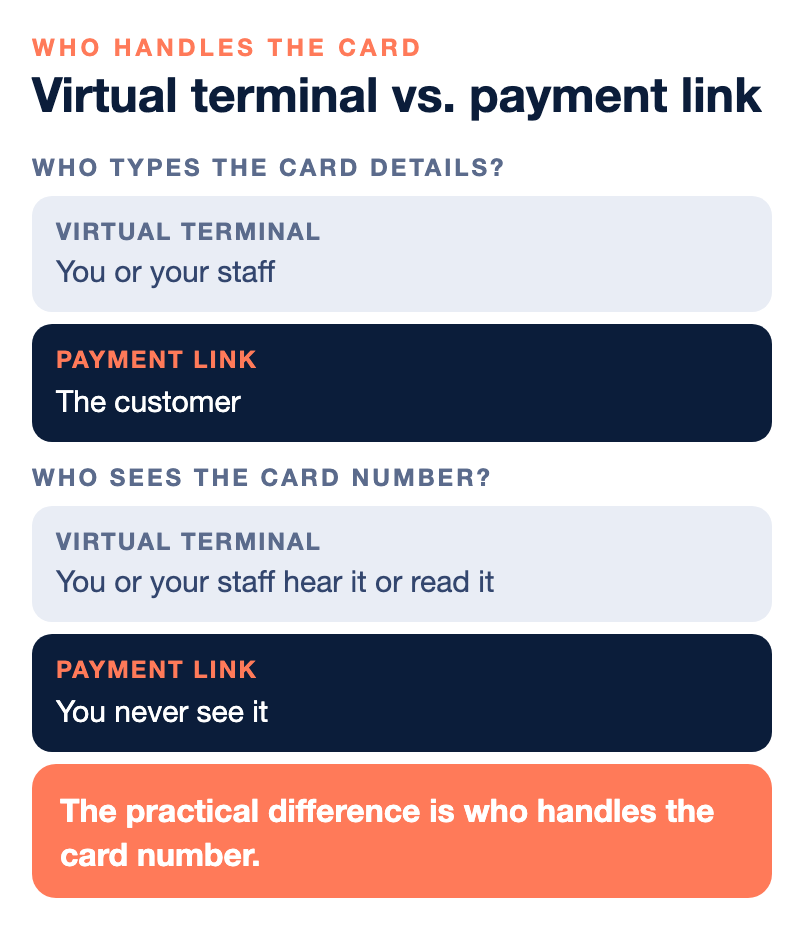
- A virtual terminal is a secure web portal where you or your staff key in a card payment, for example from a phone order. No card reader is needed. Because the card details are typed in by you, it is a card-not-present payment, and NPS says that card-present versus keyed-in is a factor in your rate.
- A payment link hands the typing job to the customer. They enter their own details on the hosted page. The link uses the gateway and your merchant account in the background.
The practical difference is who handles the card number. With a virtual terminal, you or your staff hear it or read it. With a link, the customer types it on a secure page and you never see it. That is one reason many service businesses prefer links to phone payments. Our guide on credit card machines, POS systems and virtual terminals compares the in-person and keyed-in options, and our beginner guide to accepting payments online explains the gateway, processor and merchant account.
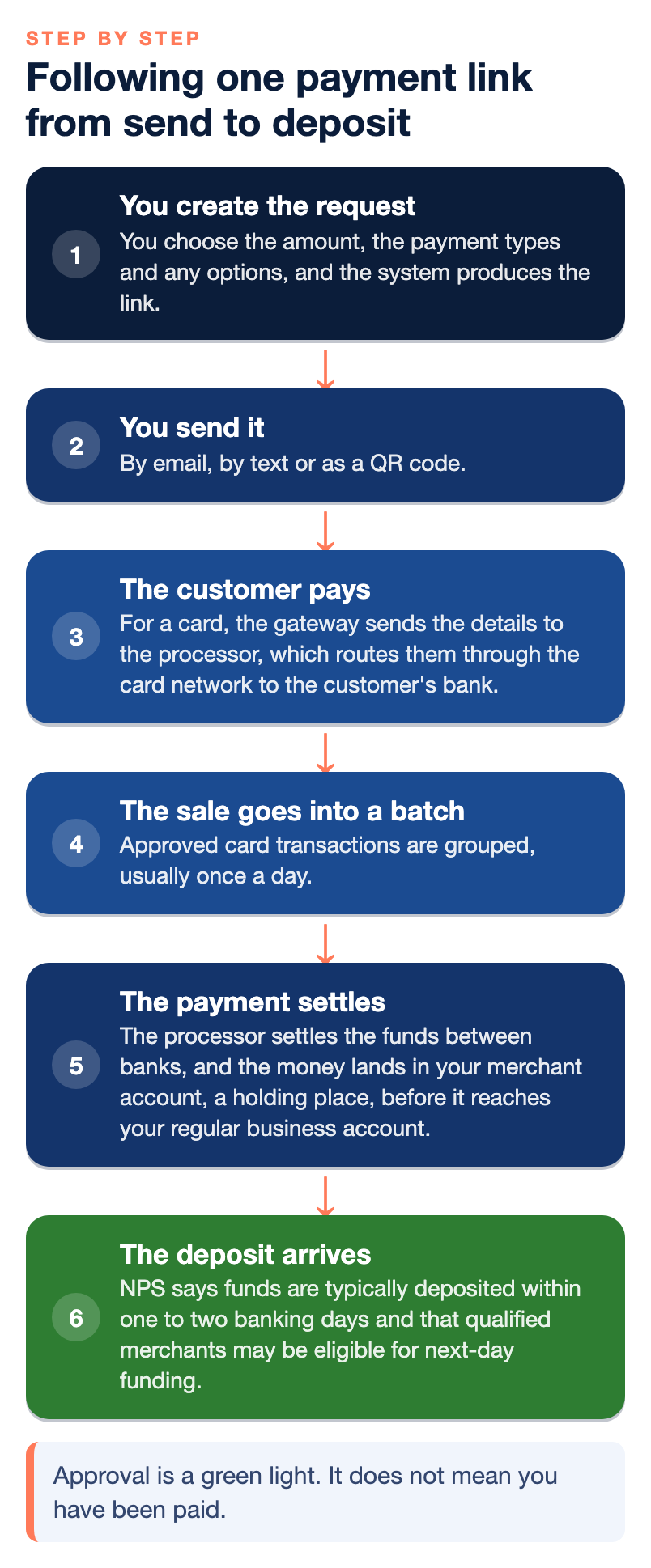
Following one payment link from send to deposit
- You create the request. You choose the amount, the payment types and any options, and the system produces the link.
- You send it. By email, by text or as a QR code. You can usually see when the message was opened. NPS says its invoicing platform confirms when an email or text has been opened, together with the payment confirmation details.
- The customer pays. For a card, the gateway sends the details to the processor, which routes them through the card network to the customer’s bank. The bank approves or declines in seconds. Approval is a green light. It does not mean you have been paid.
- The sale goes into a batch. Approved card transactions are grouped, usually once a day. Ask how your system closes batches, because a batch that is not closed or fails to send leaves those sales waiting for the next one.
- The payment settles. The processor settles the funds between banks, and the money lands in your merchant account, a holding place, before it reaches your regular business account.
- The deposit arrives. NPS says funds are typically deposited within one to two banking days and that qualified merchants may be eligible for next-day funding. Those are NPS program statements, not a promise for every account.
If the customer chooses ACH, the path is different. ACH moves money between bank accounts through the Automated Clearing House network. Standard ACH takes one to three business days, and same-day ACH is available in many cases. The rules are set by NACHA, the body that governs ACH in the United States, and they cover customer authorization, data security and how transactions are handled. Our guide to when you will actually get paid follows each path in detail.
Two settings change what you see in your bank. If your account collects fees daily, each deposit arrives net, with fees already taken out. If it uses month-end discount, deposits arrive in full and the fees come out together at the end of the month. Either is fine, as long as you know which one you have.
How an invoice differs from a link
A link is the door. An invoice is the document that explains why the customer is walking through it. NPS describes basic invoicing as sending a bill and smart invoicing as helping you collect, track and reconcile payments from one connected workflow. In plain terms, an invoice usually adds the following.
- The record of what is owed, with line items, a due date and any files the customer needs. NPS says its invoicing platform lets you attach PDF and other common file types, up to 10MB and five files.
- Partial and scheduled payments. Useful for deposits and split payments. For scheduled recurring charges, NPS recommends a subscription setup instead.
- Expiry. An invoice can be set to cancel on its own if it is not paid by a date you choose, which keeps old requests from staying open.
- Reminders and portals. Automatic reminders and a customer portal, where the customer can view history and receipts, cut the follow-up calls.
- Accounting sync. NPS describes a two-way sync with QuickBooks Online so an invoice and its payment match in both places without double entry.
If you sell to other businesses, the invoice is usually the main event, and the payment link is how it gets paid. Our pages on ACH and credit card invoicing and smart invoicing with QuickBooks describe how NPS builds this, and the ClickBillR FAQ answers setup questions. For the wider B2B view, see our guide to the best B2B payment gateway for manufacturers and distributors.
Cards, ACH and the link
A well-built link lets the customer choose. That choice affects your cost and your risk.
- Card. Fast to authorize and convenient, and many business buyers like paying with a card because it gives them float or rewards. A card sale carries the three layers of card cost, interchange, assessments and the processor’s markup, and it can be disputed.
- ACH. NPS says ACH can be a lower-cost alternative for larger and recurring invoices, and that ACH transactions are much harder to reverse without a valid banking reason. It is slower than a card approval.
NPS also notes a pattern worth knowing. A buyer gets net-30 terms, pays at day 45 or 60, and then pays by card, so the supplier finances the receivable for two months and still pays the card cost at the end. One answer NPS gives is rules-based acceptance: allow cards inside an early window and leave ACH available afterward. Our guide to whether accepting credit cards is cheaper than waiting to get paid and the one on net-30 and net-60 terms cover the cash flow side. Our ACH guide covers steering large payments toward ACH.
The risks to watch
None of these is a reason to avoid payment links. They are the places to put a control or ask a question.
Disputes on card-not-present sales
A customer who pays by card through a link is not at your counter, so there is no signed receipt in your hand. A chargeback is a reversal started by the customer’s bank. The funds leave your account first, along with a fee, and you typically have 7 to 21 days, depending on the network and processor, to respond with evidence. Missing the deadline is an automatic loss. Keep proof of the sale, such as the invoice, the delivery or completion records and your communication with the customer. Use clear billing descriptors, send receipts right away and post your refund policy. Our guides on chargebacks and how to win disputes go step by step, and the one on subscription chargebacks matters if you bill repeat payments.
Card testing on open amounts
Card testing is a bot running stolen card numbers through a payment form to learn which ones still work. NPS describes why donation forms are targeted: they accept any amount, ship nothing, ask for little and confirm success instantly. A payment page that accepts any amount without checks shares some of those traits, so ask your provider what protection exists on any open form. NPS lists bot challenges, velocity limits, address and security code checks and someone watching the alerts as controls that close most gaps. NPS describes the pattern for donation forms, so ask your provider whether the same controls apply to your payment pages rather than assuming they do. Our guide to card-testing attacks explains the pattern.
Holds and reviews
A provider may hold funds because of a sudden spike in volume, a compliance review or a rise in chargebacks. A new payment link program can create exactly that kind of change, for example when you send a large batch of invoices at once. Tell your provider before volume jumps, and keep enough cash that a late deposit does not stop payroll.
Reconciliation errors
The more places an invoice lives, the more chances there are to double-count or miss a payment. NPS describes the old setup as a credit card processor, an ACH provider, a gateway and a QuickBooks connector, each with its own contract, dashboard and support line. Ask how your invoices, payments and deposits will match, and compare the deposit summary to your bank statement each week.
Fee surprises
A convenience fee, a surcharge or a dual pricing program is one way to pass card costs to the buyer, but each has rules. Mistakes can lead to network violations or customer complaints. Ask which model your system supports and how it is set up for your state. Ask how link payments are priced compared with in-person sales, because keyed-in and online sales usually cost more than card-present ones.
Stored payment methods and recurring charges
A customer can save a payment method for future invoices, stored through tokenization. Get a clear authorization when they do, tell them what will be charged and when, and make cancellation easy. NACHA rules cover customer authorization for ACH, so ask your provider what authorization it collects and keeps.
Questions to ask before you send your first link
- Which payment types can the customer choose on the page: cards, ACH, Apple Pay, Google Pay?
- How is a link payment priced compared with a card-present sale, and is there a convenience fee or surcharge option?
- When is each payment type deposited, and will my fees come out daily or at month end?
- How does the system protect an open or reusable link from card testing?
- Can I set an expiration date, limit who sees the link and cancel an unpaid invoice?
- Does it sync with my accounting software, and how do I match deposits to invoices?
- What evidence does the system keep for a dispute: the sent time, opened time, payment confirmation and receipt?
- Who do I call, and at what hours, if a deposit is late?
Who wrote this, and where NPS fits
Nationwide Payment Systems publishes this guide. We are a payments company based in South Florida, in business since 2001, and we sell merchant accounts, a payment gateway and smart invoicing with payment links, so we are not neutral. We do not publish one universal rate, because pricing depends on volume, ticket size, card mix and risk. You can browse the full library of payments guides, or read about ClickBillR.
We are not the right fit for everyone. If you are a hobby seller with very low volume, if you only want an instant self-service sign-up, if you do not want to provide underwriting documents, or if the lowest advertised flat rate is the only thing that matters to you, a simpler platform will probably suit you better. Ask any provider for pricing and terms in writing.
Bottom line
A payment link is a secure way to ask for money without handling the card number yourself, and an invoice adds the record, reminders and accounting match that business billing needs. Both settle the way any card or ACH payment settles: approval in seconds for a card, a daily batch and a deposit in a day or two, or one to three business days for standard ACH. The risks are the familiar ones in a new place: card-not-present disputes, reviews after a jump in volume, reconciliation gaps, fee rules and bots on open forms. Ask for pricing, settlement and controls in writing before you send the first link. If you would like a second opinion on a quote or your current setup, you can contact our team, and if another setup fits you better, we will say so.
Frequently asked questions
What is a payment link?
A payment link is a secure web address you send by email, text or QR code. The customer opens it, lands on a hosted payment page and pays by card, ACH or a digital wallet, depending on what you enable.
How is a payment link different from a virtual terminal?
With a virtual terminal, you or your staff key in the customer’s card details. With a payment link, the customer enters their own details on a secure hosted page, so you never see the card number. Both are card-not-present payments.
How long does a payment link payment take to reach my bank?
The payment settles like any online payment. NPS says card funds are typically deposited within one to two banking days, with next-day funding for qualified merchants. Standard ACH takes one to three business days, and same-day ACH is available in many cases.
What is the difference between a payment link and an invoice?
A link is the way to pay. An invoice is the record of what is owed, with line items, due dates, reminders, partial payments and often an accounting sync. Many invoices include a payment link.
Can a customer dispute a payment link payment?
A card payment can be disputed through the customer’s bank, which typically gives you 7 to 21 days to respond with evidence. ACH is harder to reverse without a valid banking reason. Keep proof of the sale and delivery.
Are payment links safe?
The hosted page and tokenization keep card data off your systems, but the risks of any online payment remain, including disputes, reviews after a jump in volume and card testing on open forms. Ask your provider what controls exist.
Can I charge a fee when a customer pays by card through a link?
Some systems support convenience fees, surcharges or dual pricing. Rules differ by state and card brand, so check compliance with your provider before you turn one on.
Should I let customers pay an invoice by card or ACH?
Often both. ACH can be a lower-cost option for larger and recurring invoices, while cards are convenient. Some sellers allow cards inside an early window and keep ACH available afterward.