In a fully integrated point of sale (POS), taking the card is part of the POS system itself, so the sale and the payment live in one system from one provider. In a semi-integrated setup, the POS software and the card terminal are separate devices that pass information to each other, so the register rings up the sale and the terminal handles the card. The words are used loosely across the industry, which means the useful question is not which label a vendor uses but what actually happens to the card, the money and the data in each sale. This guide explains both setups in plain words, what each means for payments, reporting and cost, and the questions to ask before you sign.
The short answer
- Neither is better for everyone. The right choice depends on how you sell, how many items and locations you manage, and how much you want payments and the POS to be one decision.
- Ask where the card is read. Card-security rules reach every system that stores, processes or transmits readable card data, so the key question is whether a readable card number ever touches your register software or network.
- Ask whether you can leave. Some POS hardware works with only one processor. A tight bundle can mean one support line, and it can also mean a double change if you ever want to move.
- Reporting improves when the sale and the payment are connected. A card machine on its own does not track inventory or sales tax, and it does not connect to accounting tools.
- Get costs for each channel in writing. Equipment terms, the processing model for card-present and keyed-in sales, and the exit terms all change the real price.
Three setups that get mixed up
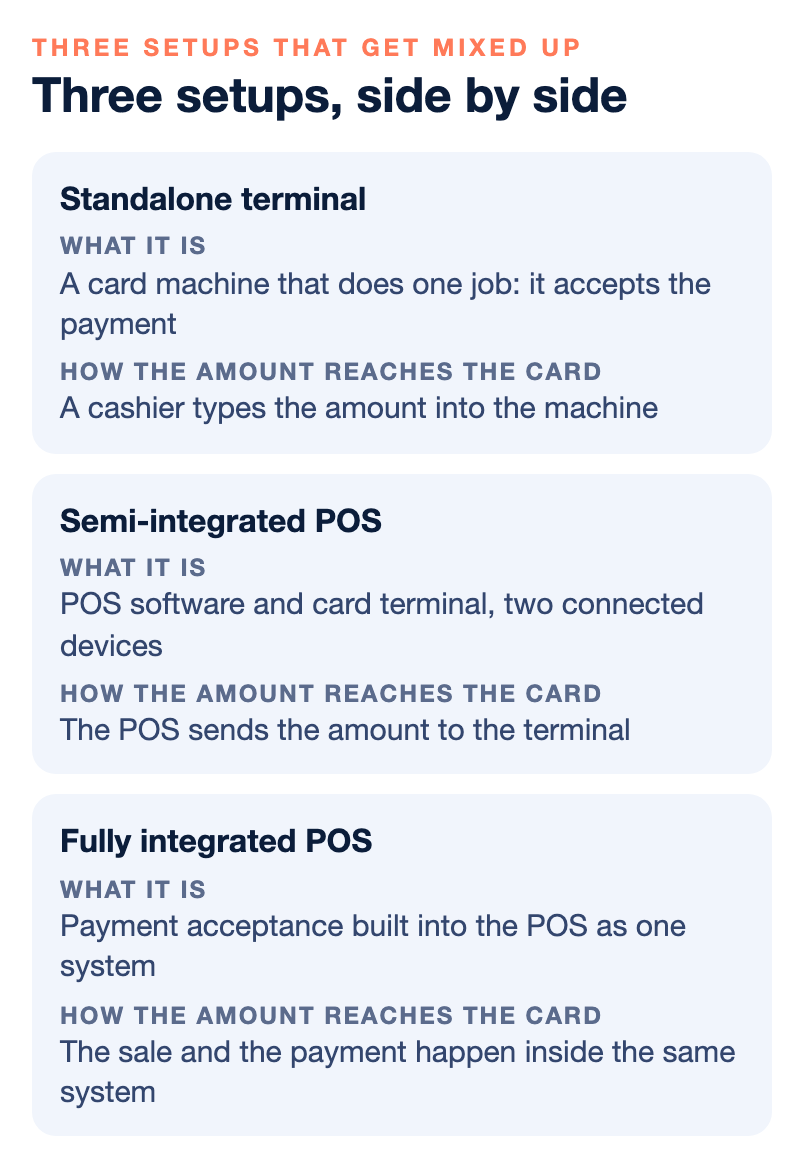
Before comparing the two, it helps to separate three things that sales conversations often blur together. We use the following plain definitions in this guide. Vendors differ in how they use the terms, so treat these as a starting vocabulary and ask each provider to describe its own setup in its own words.
A standalone terminal. This is a card machine that does one job: it accepts the payment. It does not do sales tax reporting, inventory tracking, customer data or accounting connections. A cashier rings up the sale somewhere else, or on paper, and types the amount into the machine. For a stand with a short menu and one price list, that can be enough.
A semi-integrated POS. Here the POS software and the card terminal are two devices that are connected. The POS holds the items, prices, tax and staff, and it sends the amount to the terminal. The customer dips, taps or swipes on the terminal, and the result comes back to the POS. The card is read on the terminal, not on the register.
A fully integrated POS. Here payment acceptance is built into the POS as one system, usually from one provider, with one place to look for the sale, the payment and the support. The card hardware and the software are designed and sold together.
Notice what is the same in all three. Every one of them still needs a merchant account behind it, and every one still touches the same card networks. The difference is how many pieces you manage, who owns each piece, and where sensitive data travels. If you want the wider picture of card machines, POS systems and virtual terminals, our comparison of a credit card machine, a POS system and a virtual terminal covers it side by side.
What happens during one sale
The easiest way to see the difference is to walk through a single sale. Picture a customer buying three items at your counter.
With a standalone terminal, your cashier adds up the sale by hand or on a separate register, then types the total into the terminal. The customer pays. The terminal prints a receipt. At the end of the day, someone compares the terminal total to the sales record. If a number was mistyped, the two will disagree, and a person has to find out why.
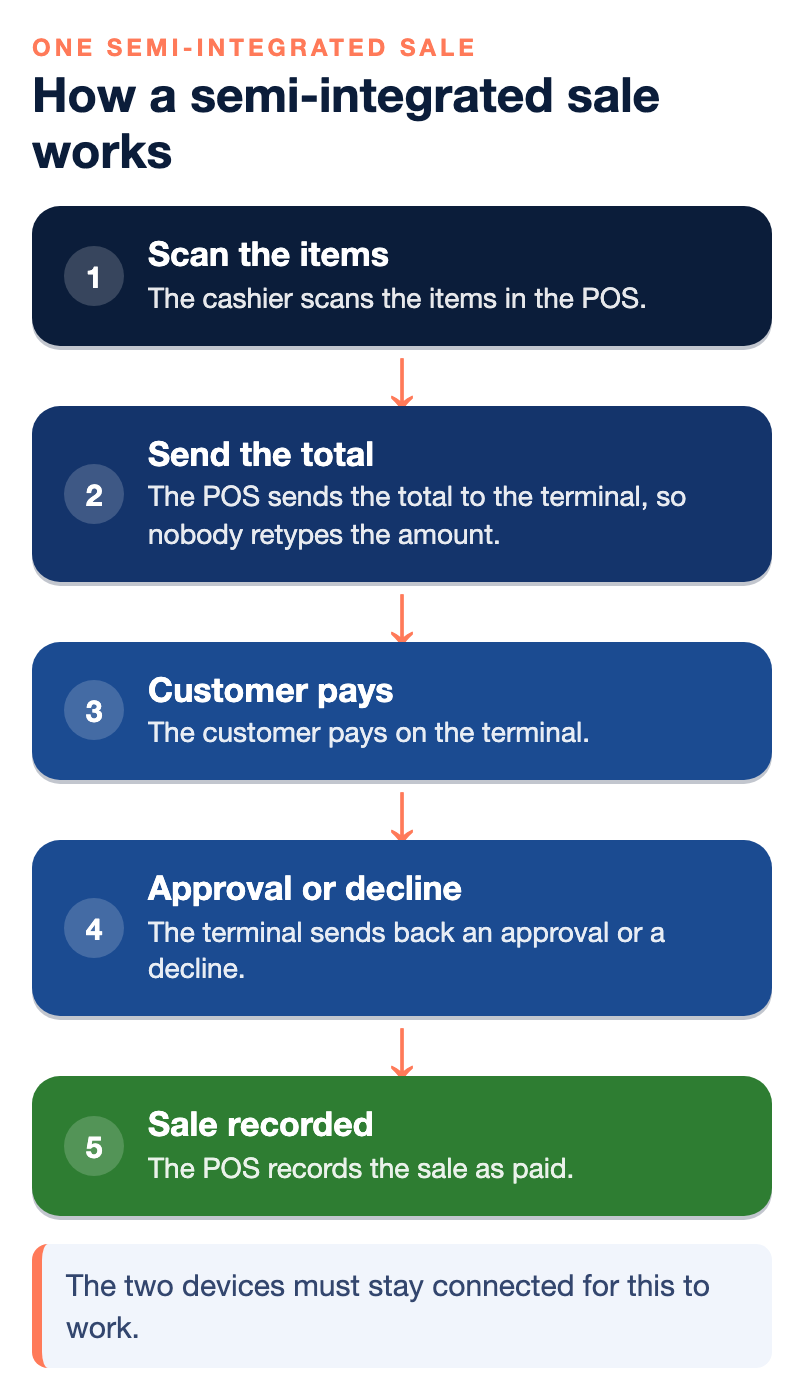
With a semi-integrated setup, the cashier scans the items in the POS. When the customer is ready to pay, the POS sends the total to the terminal, so nobody retypes the amount. The customer pays on the terminal. The terminal sends back an approval or a decline, and the POS records the sale as paid. The two devices must stay connected for this to work, so it matters how they connect, what happens when the link breaks, and who supports each device.
With a fully integrated setup, the sale and the payment happen inside the same system. The cashier scans the items, the customer pays on a reader that belongs to that system, and the POS records the sale with the payment attached. When something goes wrong, there is one provider to call.
Our own guide to how tap to pay works at the hardware level shows what data leaves a terminal in a contactless payment, which is useful background for all three setups.
What it means for payments and card security
Card-security rules apply to every system that stores, processes or transmits readable card data. That is why the most important question in this whole topic is a simple one: does a readable card number ever reach your register, your back-office computer or your network?
When a card is read on a terminal that encrypts the number inside the reader, the rest of your equipment sees only scrambled data. When a card number is typed into a register screen, a browser or a spreadsheet, it has traveled outside that protected path. Our article on what P2PE validation actually certifies and what it leaves uncovered explains point-to-point encryption and the trap of a brochure that says “encrypted” when the solution is not on the official validated list. Ask for the listing by name, and check that your exact devices are on it.
The yearly paperwork depends on this too. As we explain in PCI DSS vs. card network rules, the self-assessment questionnaire you complete depends on how your business takes cards: a standalone terminal, an integrated POS on your network, a hosted payment page online, or a combination. Encrypted readers can change what applies. So do not assume that a fully integrated system is automatically simpler to certify, or that a semi-integrated one automatically is. Ask your processor which questionnaire fits your setup, and get the answer in writing.
Physical security matters in both setups. The terminal is the one piece of payment equipment a stranger can touch, and our guide to the POS terminal as an attack surface explains how tampered or swapped devices and fallback to keyed entry are used to attack a store. Two connected devices means two things to inspect, update and keep track of.
What it means for reporting
This is where connecting the sale to the payment pays off most clearly. A plain card machine has no sales tax reporting, no inventory tracking, no customer data and no direct connection to accounting tools. A POS can report by product, category or location, calculate tax, track inventory, track employees and link to accounting software such as QuickBooks.
The reporting question to ask is not “does it have reports?” It is “when a sale is paid, does the payment land in the same record as the sale?” When the amount is passed from the POS to the terminal and the result comes back, the register and the payment can match without anyone retyping a number. When the two are not connected, the register total and the card total can drift apart, and a person ends up reconciling them. NPS describes integrated payment processing in a retail POS as connecting card payments directly to the checkout process, which helps reduce manual entry errors, simplify reconciliation and create a faster customer experience.
Also ask about refunds, voids and tips. Refunds and voids by staff are one of the entry points for card-present fraud, so you want to know whether a refund made in the POS actually reaches the customer’s card, and whether the POS records who did it. Ask to see a refund, a void and a tip adjustment done live on a demo, not described on a slide.
What it means for cost
NPS does not publish one universal rate, and neither should you expect to see one from any provider, because pricing depends on volume, ticket size, how you take payments, equipment and risk. What you can compare is the structure. Ask these questions about each setup you are quoted.
- Equipment. Do you buy it, lease it, or pay a monthly fee? Who owns the terminal and the POS hardware at the end?
- Software. Is the POS software a separate monthly charge, and is it on the same contract as processing?
- Processing. Which rate or pricing model applies to card-present, keyed-in and online sales? Card-present versus keyed-in is a factor in your rate, so a store that keys in many cards should check this carefully.
- Support. Is support one number or several? When the POS and the terminal come from different companies, a problem can turn into a game of who is on first.
- Leaving. What does the contract say about the term, renewal and early exit, and does equipment have to be returned or paid off?
A tightly bundled setup is not always bad. A bundle can mean one support line and one bill, which many owners prefer. The point is to understand the trade before you sign, not after.
Can you change processors later?
This is the question owners skip, and it often decides how expensive a wrong choice turns out to be. In our guide on how to choose a POS system when you do not know how your business will grow, we point out that some POS hardware works with only one processor. If you later want to change processors to fix your fees or your support, you may have to replace every terminal and register at the same time.
Ask three things. Do the card readers and terminals work only with one payment company? Do you own the equipment, lease it, or rent it as a service? And does the POS work with more than one processor? Confirm that last answer with the processor you might move to, not only with the POS company. When the POS and the processor are bundled so tightly that neither works without the other, every future change is a double change. Whether you are in a semi-integrated or a fully integrated setup, that is the test of how locked in you really are.
Which setup fits which business
Choose by how you sell, not by which device looks newest. These are starting points, not rules.
- A very simple counter business. A standalone terminal can be enough. If you find yourself writing sales into a spreadsheet, you have probably outgrown it. Our note on going from terminals to POS systems covers that move.
- A store with a larger catalog, regulated products or several registers. You need a POS with inventory control and tax reporting. NPS offers its own retail POS with integrated payment processing, and for larger or more complex retailers it supports NCR Counterpoint, including integrated payments. In one of our case studies, two retailers moved to NCR Counterpoint and gained integrated EMV payment processing, which you can read in the NCR Counterpoint and dual pricing case study.
- A restaurant or bar. A restaurant POS handles tables, tips and menus rather than barcodes. See our guide to a POS system for a small restaurant or bar.
- A business that also sells online, by phone or by invoice. The counter is only one channel. Ask how phone orders, online checkout and invoices connect to the same merchant account and reports. Our payment gateway guide and our page on omnichannel payment solutions cover those channels.
If you are not sure how your business will grow, buy for the next 12 to 18 months, and choose the system you can leave most easily, not the one with the longest feature list.
Questions to ask any provider
Bring this list to every demo. Get the answers in writing.
- In my setup, where is the card read, and does a readable card number ever reach my register or network?
- Is the encryption solution on the official validated list, and are my exact devices on it?
- Which PCI self-assessment questionnaire applies to this setup?
- If the POS and the terminal lose their connection, can I still take a card? How is that sale matched to my register afterward?
- If staff key in a card, how is that sale priced, and is the risk different?
- Who owns the terminal and the POS hardware, and does it work with another processor?
- How do I export my products, customers and sales history, and is there a fee?
- Who do I call when the POS stops working, and who do I call when the payment stops working? Is it the same number?
- What does the contract say about term, renewal and early exit?
- Can I upgrade or add channels without opening a new account or starting over?
Our 20-question checklist for choosing an SMB retail POS goes deeper on the POS side of this list.
Common mistakes
- Buying on the label. The words semi-integrated and fully integrated are used loosely. Make the vendor describe, step by step, what happens to the card and the data in one sale.
- Assuming “encrypted” means validated. A brochure phrase is not a listing. Ask for the listing.
- Skipping the exit. Owners compare features and forget to ask what leaving costs.
- Forgetting the failure case. Everything works on demo day. Ask what happens on a busy Saturday when the internet or the link between devices goes down.
- Treating payment as one decision with the POS when it should be two. Or the reverse. Know which one you are making.
Who wrote this, and where NPS fits
Nationwide Payment Systems publishes this guide. We are a payments company based in South Florida, in business since 2001, and we sell POS systems and merchant accounts, so we are a participant here, not a referee. We provide terminals and POS systems for retail stores, restaurants, bars, liquor and convenience stores, smoke shops and specialty retailers, and our POS includes integrated payment processing. We also support NCR Counterpoint for larger retailers, and we are not locked into a single product line. We do not quote rates on this page, because pricing depends on your industry, volume, average sale and how you take payments. We also do not claim that every setup we sell uses a validated point-to-point encryption solution, so ask for the details for your account. If you want a plain look at the POS options we offer or a second opinion on a quote, you can contact our team, and you can browse the full library of payments guides. If another setup fits you better, we will say so.
Bottom line
Semi-integrated and fully integrated are two ways of connecting the sale to the payment. In the first, the POS and the terminal are connected devices. In the second, they are one system. Either can work well. What decides whether it works for you is where the card is read, whether the sale and the payment land in the same record, what you pay for equipment and keyed-in sales, and whether you can leave without replacing everything. Ask each provider to walk through one sale, step by step, and put the answers in writing.
Frequently asked questions
What is the difference between semi-integrated and fully integrated POS?
The terms are used loosely, so confirm what a vendor means. In general, a semi-integrated setup keeps the POS software and the card terminal as two connected devices, while a fully integrated setup builds payment acceptance into the POS itself as one system from one provider. The practical test is where the card is read and whether a readable card number ever reaches your register software.
Which one is cheaper?
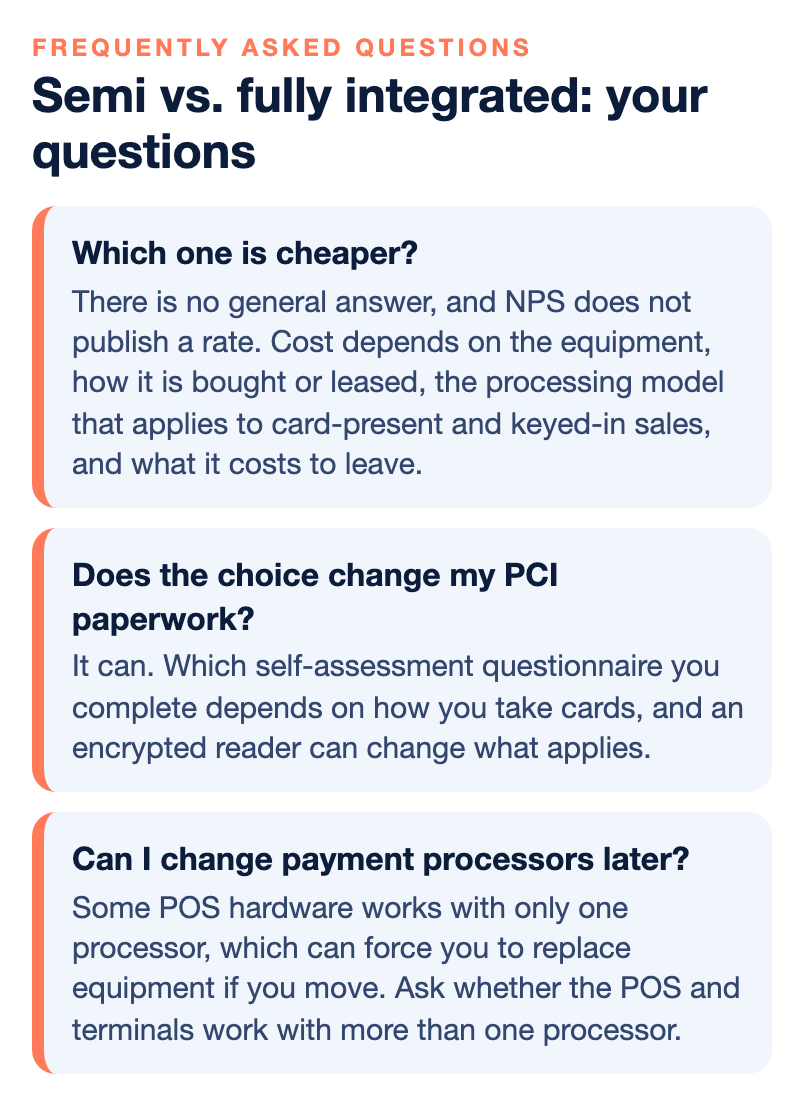
There is no general answer, and NPS does not publish a rate. Cost depends on the equipment, how it is bought or leased, the processing model that applies to card-present and keyed-in sales, and what it costs to leave. Ask for each of those in writing before you compare.
Does the choice change my PCI paperwork?
It can. Which self-assessment questionnaire you complete depends on how you take cards, such as a standalone terminal or an integrated POS on your network, and an encrypted reader can change what applies. Ask your processor which questionnaire fits your exact setup.
Can I change payment processors later?
It depends on whether the POS and the processor are one decision or two. Some POS hardware works with only one processor, which can force you to replace equipment if you move. Ask whether the POS and terminals work with more than one processor, and confirm it with the processor you might move to.
What happens if the terminal and the POS stop talking to each other?
Ask before you buy. Find out whether staff can still take a card, whether they must key the amount in by hand, how the sale is matched to the register afterward, and whether keyed entry changes the cost or the risk of that sale.
Do I need a POS at all, or is a card machine enough?
A card machine can be enough for very simple counter sales. If you track inventory, sell regulated products, need tax reporting, or want your books to match your register, a POS fits better. Our comparison of card machines, POS systems and virtual terminals walks through it.