Recurring donation billing survives expired cards when four things work together: the card is stored as a token with the donor’s permission, your processor keeps it current through the card networks’ updater services, failed charges are retried with judgment instead of force, and a real person asks the donor for a new card before the gift quietly lapses. Most monthly donors who stop giving never meant to stop. Their card expired, their bank sent a new one after a fraud scare, and nobody told them the gift had failed. This guide walks through how to set up each layer, what to ask your processor before you launch, and how to talk to a donor whose card has failed so you keep the person and the gift.
The short answer
- Store the card as a token, not as a number. Your payment system should vault the card so it can be charged again on schedule without anyone at your organization ever seeing or keeping the full number.
- Ask your processor whether card updater services are turned on for your account. Visa and Mastercard both run programs that let a card’s issuing bank pass along a new number or expiration date. They do not catch every card, but they quietly fix many before the charge ever fails.
- Retry soft declines, never hard ones. A gift declined for low funds may go through a few days later. A gift declined because the card was reported lost or stolen should never be tried again.
- Contact the donor early and warmly. A thank-you first, then a simple link to update the card, sent before the expiration date when you can see it coming.
- Offer a bank-account option. A checking account does not have an expiration date, so donors who give by ACH are not exposed to the most common reason recurring gifts fail.
Who wrote this
Nationwide Payment Systems (NPS) publishes this guide. We have helped businesses and organizations take payments from South Florida since 2001, and our NPS One platform includes donation pages and recurring billing for nonprofits. So we sell one of the tools discussed here. We have tried to write the guide so it is useful whichever processor you use, and we say plainly below where NPS is not the right fit. Nothing here is tax or legal advice. Talk to your accountant about how recurring gifts are receipted and reported.
Why monthly gifts fail when nothing is wrong
When a monthly donor stops giving, it is tempting to assume they lost interest. Very often the donor still cares just as much and simply has no idea the gift stopped. A recurring donation is a stored payment that your system runs on a schedule, weeks or months after the donor last thought about it, and plenty can change with the card in between.
The most common reason is the plainest one. Cards expire. Every card carries an expiration date, and when that month passes, the old date no longer works. Your system tries the charge with the details it has on file, and the issuing bank declines it. The NPS guide to credit card error codes and what they mean lists the expired-card response as Error 54 and is blunt about the fix: an expired card will not go through, so you need the new card details.
The second reason is reissue. When a bank suspects fraud, or a donor reports a card lost or stolen, the bank closes that card number and mails a new one. The donor’s wallet is fine, but every merchant and every charity holding the old number is now holding a dead one. Many donors replace a reissued card and only update the handful of accounts they remember, which rarely includes a gift they set up a year ago.
The third group is temporary. A charge may be declined for insufficient funds, a daily limit, or an issuer’s fraud filter reacting to a pattern it does not like. These are soft declines, and the same card may work a few days later. The danger is treating a temporary decline as a permanent one, or the reverse.
That gives you a useful way to think about the whole problem. Some failures can be prevented before the charge runs, some can be fixed by trying again at the right time, and some can only be fixed by the donor. A good setup handles all three, in that order, and only bothers the donor when it has to.
Layer one: store the card the right way from the first gift
Everything else depends on how the card was saved when the donor first signed up. Recurring billing should run on a stored token, which is a stand-in value your payment system keeps in a secure vault in place of the actual card number. NPS describes this on its own recurring billing page as Payment-on-File, the tokenization and vaulting feature in NPSONE that lets an organization charge a returning customer on schedule while staying PCI compliant. Whatever system you choose, the principle is the same. Nobody at your organization should be keeping card numbers in a spreadsheet, a donor database note field, or an email, both because it is a security risk and because a card number typed into a spreadsheet can never be updated automatically.
The sign-up moment also matters for a quieter reason. The card networks expect a merchant that stores a card for future charges to tell the cardholder what it will do with it, and to record that agreement. In plain terms, the donor should see the amount, how often it will be charged, when the first charge happens, and how to change or cancel. Banks treat a charge that follows a clearly agreed schedule differently from a random charge on a stored card, and a donor who remembers agreeing is far less likely to dispute a gift they forgot about. Ask your processor how its forms record that agreement and whether the first gift marks the card for future scheduled charges.
Two smaller choices at sign-up save trouble later. Collect a working email address and, where the donor is willing, a phone number, because the last layer of this system depends on reaching people. And give the donor a choice of dates where your software allows it. A donor who is charged a day after payday is less likely to hit an insufficient funds decline than one charged the day before.
Layer two: let the card networks update the card for you
This is the layer most organizations never hear about, and it does the most work out of sight. Visa and Mastercard each run an account updater service. When a bank issues a new card number or a new expiration date and takes part in the service, that update can be passed to merchants who are enrolled through their processor. Your system then charges the new details, and the donor never knows anything changed. Some updater services run in batches before your billing date, others work at the moment of the charge, and processors set them up in different ways.
Three things are worth knowing before you count on it. First, not every bank participates, so updaters reduce failures without ending them. Second, an updater can also report that an account has been closed, or that the cardholder should be contacted. That is useful information, because it tells you to stop retrying and start talking to the donor. Third, updater services are not automatic on every account. Some processors include them, some charge a fee for each update or each lookup, and some simply have not switched them on. NPS’s own guide to choosing a processor lists account updater among the things a subscription business needs, alongside customer vaults and failed-payment retries, and the same logic applies to a monthly giving program.
So ask directly, and ask for the answer in writing. Is an account updater service active on my account for Visa and Mastercard? What does it cost? How often does it run? Does it cover cards stored before it was switched on? What does my system do when the update says the account is closed? A processor that cannot answer these questions clearly is telling you something about how much attention your recurring gifts will get.
Card networks are also moving toward network tokens, which are tokens issued by the card brand itself and can stay current when the underlying card changes. Whether your gateway uses them, and for which brands, is another fair question for your processor. You do not need to understand the plumbing. You only need to know whether a reissued card will keep working without the donor lifting a finger.
Layer three: retry with judgment, not force
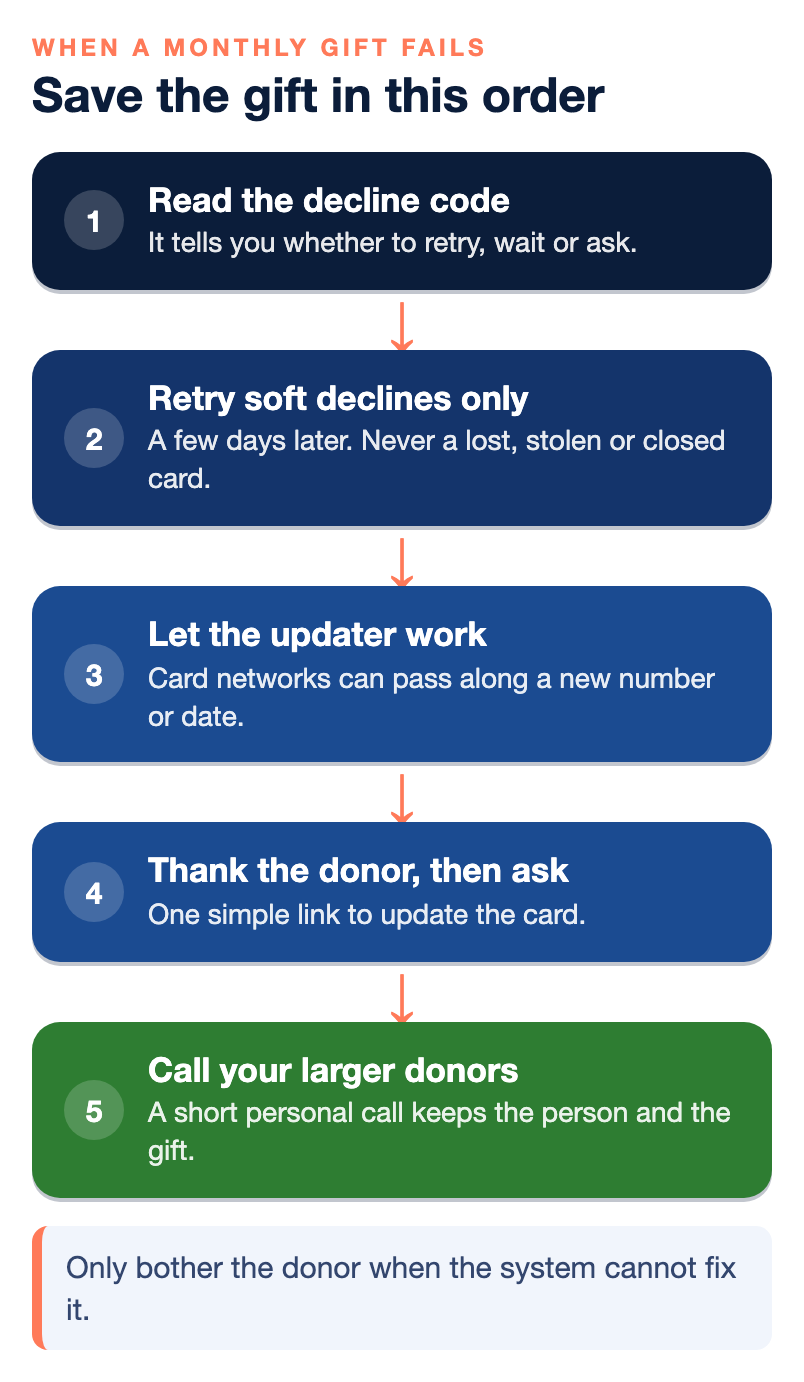
When a charge fails, the decline code tells you what kind of failure it was. That code is the most valuable piece of information in the whole process, and many small organizations never look at it. A soft decline, such as insufficient funds or a temporary issuer hold, is worth retrying. A hard decline, such as a card reported lost or stolen, a closed account, or an invalid card number, is not, and retrying it can make things worse.
The NPS error-code guide makes this point from long experience with merchants. Retrying the same card over and over after a decline can trigger a fraud block on the cardholder’s account, which means the donor may have to call their bank before any charge works, yours included. It also says plainly that you should only retry after the issue is resolved, and that some codes mean stop entirely. Card networks have their own rules about how many times a declined card may be retried and over what period, and those rules change, so ask your processor what limits apply to your account rather than guessing.
In practice, a sensible schedule spaces a small number of retries over several days instead of firing them within the hour, and it stops the moment a hard decline comes back. If your donors tend to be paid on a particular schedule, try again after that date rather than before it. Your recurring billing software should let you set this up once and then run it for every donor, so nobody on your team is trying cards by hand. NPS’s recurring billing explainer describes automatic retry attempts, email reminders and self-service update portals as the basic tools for handling failed payments, and those are a good minimum to expect from any platform.
Keep one rule above all the others. A retry should never be a surprise to the donor. If a charge fails and you plan to try again, your first notice to the donor should already have gone out, so a retry that succeeds feels like a resolved problem and not a second unexpected charge.
Layer four: ask the donor in a way that keeps them
Automation will catch a share of failed gifts. The rest need a human touch, and how you ask matters more than how often. A donor whose gift failed has done nothing wrong. They chose to support you every month, and the system dropped the ball. The message should sound like that.
Start before anything fails. When your system can see a stored card’s expiration date coming up, send a short note a few weeks ahead. Thank the donor for their monthly support, tell them in one sentence what that support has made possible, and give them a single link to update their card. Many donors will update right away, because you caught them while the reason they give is fresh in their mind.
When a gift does fail, send the first notice the same day or the next. Keep it short and kind. Say the gift did not go through, say it is most often because a card expired or was replaced, and give the same simple link. Do not lead with the amount owed, and never describe the donor as late or overdue. They do not owe you anything. If there is no response, a second note a week or so later is reasonable, ideally from a named person at your organization rather than a no-reply address.
For larger monthly donors, pick up the phone. A two-minute call from a staff member or board member who says thank you and mentions the card in passing does more than any email sequence, and it often strengthens the relationship rather than straining it. Decide in advance what monthly amount earns a call so your team does not have to make that judgment case by case.
Make the update itself easy. The link should open a secure page, already tied to that donor’s gift, where they enter the new card and nothing else. If updating the card requires logging into an account the donor does not remember creating, many will give up. Ask your processor whether its recurring billing tools include a self-service page or a payment link that can replace the card on an existing gift without starting a new one.
Give donors a second road that does not expire
Offering bank-account giving through ACH removes the most common failure point entirely, because a checking account has no expiration date and is not reissued after a lost wallet. Bank transfers have their own failure reasons, such as a closed account or insufficient funds, and they take longer to settle than card payments, so they are not a cure-all. For a steady monthly gift from a loyal donor, though, they are often the more durable choice. NPS says its NPSONE gateway supports both cards and ACH for recurring billing, and most serious payment platforms offer the same.
A gentle way to introduce it is at the update moment. When a donor comes back to replace an expired card, show both options side by side and let them choose. Some will move to a bank account simply because it means they will not get this email again in three years.
You can also give donors the option to cover the processing fee on their gift. NPS One’s donation tools include this as an option on donation pages, and many donors are glad to add a little so that the full gift reaches the cause. It does not prevent a failure, but it does make each surviving gift worth a bit more to your organization, and it signals to donors that you are careful with their money.
What to settle with your processor before the first donor signs up
Most of the problems in this guide are decided in the setup, long before the first failed gift. A recurring giving program built on a payment page that was never meant for recurring billing will leak donors no matter how hard your team works the follow-up. Before you launch, or before you move an existing program, sit down with your processor and get clear answers on the points below. If you are still choosing a processor, NPS’s guide to how to compare payment processing providers covers the wider questions, and the overview of what a merchant account is explains who holds your money between the gift and your bank account.
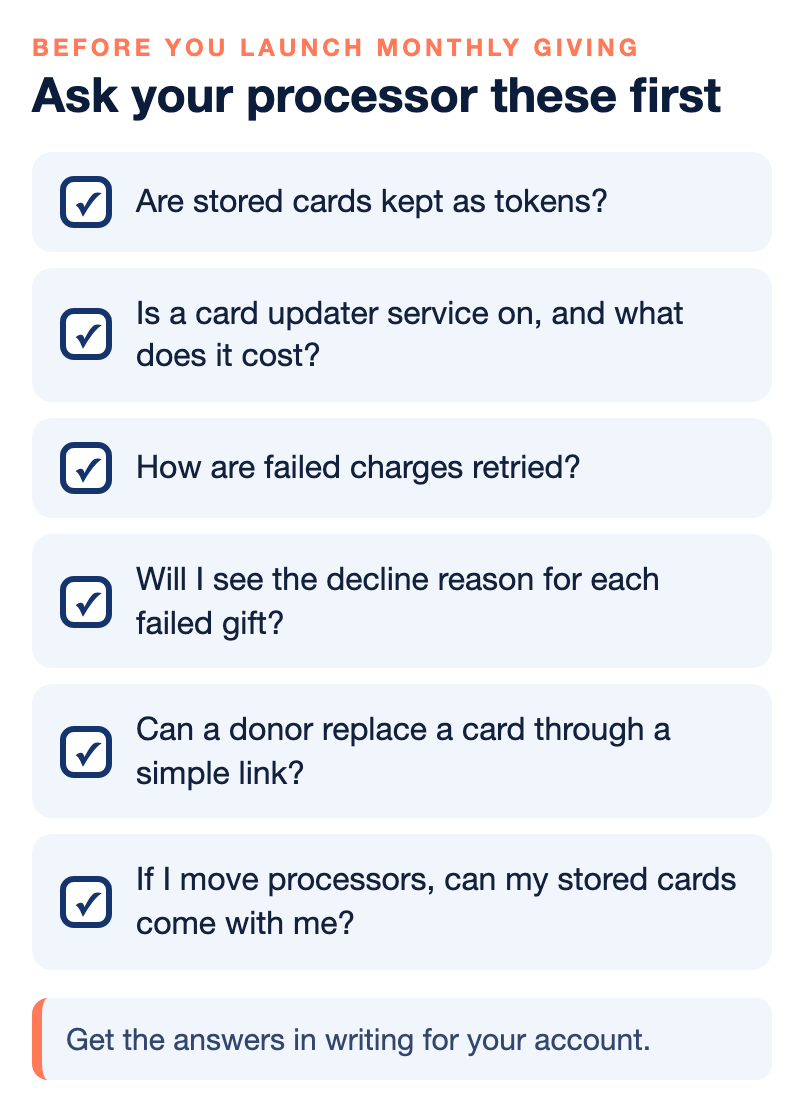
| Question to ask | Why it matters for monthly donors |
|---|---|
| How are stored cards kept, and can my team ever see the full number? | Tokens in a vault can be updated and charged safely. Numbers in a spreadsheet cannot be updated and put you at risk. |
| Is an account updater service active on my account, and what does it cost? | This is the layer that fixes many expired and reissued cards before a gift ever fails. |
| How does the system retry a failed charge, and can I change the schedule? | Retries should be spaced, limited, and stop on hard declines. |
| Will I see the decline reason for each failed gift? | The reason tells you whether to retry, wait for the updater, or contact the donor. |
| Can a donor replace a card on an existing gift through a simple link? | An update that requires a login or a brand new gift loses donors. |
| Can donors give by bank account as well as card? | ACH gifts do not expire, which removes the most common failure. |
| How will I be notified when a gift fails? | A daily list or an automatic notice to your donor system means no failure sits unnoticed for a month. |
| If I move processors, can my stored cards come with me? | Some processors can transfer tokens securely and some cannot. Losing them means asking every donor to sign up again. |
That last question deserves extra weight. Monthly donors are the hardest-won supporters you have, and a processor change that forces each of them to re-enter a card will cost you a share of them for no reason except the switch. Ask how card data would be moved in and out before you sign, not when you want to leave.
What to watch every month
A monthly giving program needs a monthly look at a small set of numbers, and none of them require special software. Count how many gifts were scheduled, how many failed on the first try, how many were saved by a retry or an updated card, how many were saved after you contacted the donor, and how many were lost. Then look at the decline reasons for the lost ones. If most are expired cards, your pre-expiry notes and your updater service need attention. If most are insufficient funds, look at your billing dates. If most are hard declines from lost or stolen cards, your donor outreach is the part that matters.
Watch for patterns that point to the system rather than the donors. A sudden jump in failures across many donors at once can mean a setting changed, a token problem after a software update, or an issue at the processor. That is the moment to call your processor’s support line rather than email donors one by one. NPS’s recurring billing guide covers the wider benefits of automated billing for any organization that bills on a schedule, and it is a good companion to this page if you are setting up recurring payments for the first time: recurring billing and its key advantages.
It is also worth checking the donor side of the reports. A donor who has failed, been saved, and failed again within a year may be telling you their card situation is unstable, and a quiet suggestion to switch to a bank-account gift can save you both the trouble.
Where NPS fits, and where it does not
NPS is a good match for a nonprofit that wants donation pages, recurring giving and card and bank payments on one account, with a person to call when a gift fails. NPS One lets an organization create separate donation pages for a general fund, a campaign or an event, each with its own QR code, sends donation receipts automatically, and supports recurring schedules from weekly to annual, including set payment counts. Our NPSONE recurring payments overview describes the billing models and the Payment-on-File vault in more detail. We offer 24/7 live support and a dedicated account manager, and we price each account individually rather than publishing one rate for everyone, so ask us for a written quote.
We are probably not the right fit if what you need is a full fundraising and donor-management system, with peer-to-peer campaigns, donor research, grant tracking and a large email platform all in one place. Those are different tools, and a payment account sits underneath them rather than replacing them. We are also not built for a group that wants to sign up in five minutes with no review of the organization, since every account goes through underwriting. And if your gifts are a handful of checks a year, a monthly card program may be more machinery than you need.
On account updater services and retry settings in particular, ask us the same questions you would ask anyone else, and get the answers in writing for your account. The right answer depends on how your program is set up, and you should not have to take anyone’s word for it, including ours.
Bottom line
Recurring donations rarely fail because donors change their minds. They fail because cards expire and get replaced while the gift keeps running on old details, and because nobody notices in time. Treat it as four layers. Store the card properly with the donor’s clear agreement, let the card networks update it, retry only the declines that can recover, and reach out to the donor with gratitude before a gift lapses. Get your processor’s answers on tokens, updater services, retries and card portability in writing before you launch. Do those things and most of the monthly donors you lose today will still be giving next year.
Next step
If you are setting up monthly giving or want a second opinion on the program you already run, contact Nationwide Payment Systems and ask for a review of your recurring setup. For more guides on fees, processors and payment setup, visit our payments guides library.
Frequently asked questions
Why do recurring donations fail when the donor still wants to give?
Most often the card on file expired or was replaced by the bank after a fraud alert or a lost wallet. The donor still wants to give but does not know the gift stopped. Some failures are temporary, such as insufficient funds on the billing day.
What is a card account updater service?
It is a program run by the card networks that lets a participating bank pass a new card number or expiration date to merchants enrolled through their processor. Your system then charges the new details without the donor doing anything. Not every bank participates, so it reduces failures without ending them.
Does my processor turn on account updater automatically?
Not always. Some processors include it, some charge for each update, and some have it switched off unless you ask. Ask your processor whether it is active on your account, what it costs, and get the answer in writing.
Should we retry a declined recurring gift?
Retry soft declines, such as insufficient funds, a few days later and only a few times. Never retry a card reported lost or stolen or a closed account. Repeated retries can trigger a fraud block on the donor’s card.
How should we tell a donor their recurring gift failed?
Thank them first, explain in one line that a card often fails when it expires or is replaced, and give one simple link to update it. Never call the gift late or overdue. For larger monthly donors, a short personal phone call usually works better than another email.
Is ACH better than cards for monthly donations?
For many steady monthly gifts it is more durable, because a bank account has no expiration date and is not reissued after a lost wallet. ACH gifts can still fail for a closed account or low funds, and they take longer to settle. Offering both and letting donors choose works well.
Can our stored donor cards move with us if we change processors?
Sometimes. Some processors can transfer stored card tokens securely to a new processor, and some cannot. Ask before you sign up, because losing stored cards means asking every monthly donor to start their gift again.