Moneyball for Payments: Why the Biggest Name Is Not Always the Best Value
Discover what Moneyball can teach businesses about credit card processing, hidden costs, debit optimization, ACH, and smarter payment strategies.
Presented by Allen Kopelman, CEO — Nationwide Payment Systems-Host of B2B Vault: The Biz2Biz Podcast
AI Overview
Moneyball for Payments compares credit card processing to the data-driven strategy used by the Oakland A’s in Moneyball. The article explains that businesses should not choose a payment processor only because of brand recognition, simple setup, or an advertised flat rate. Instead, they should evaluate the full payment picture, including effective processing cost, debit versus credit mix, commercial-card optimization, Level 2 and Level 3 data, ACH opportunities, invoicing workflows, integrations, settlement timing, and cash flow. Nationwide Payment Systems positions NPSONE as a smarter, customized payment platform that helps businesses identify overlooked value, reduce unnecessary costs, collect faster, and build a payment strategy that fits their actual operations.
sponsored by

What the Oakland A’s can teach business owners about credit card processing, hidden costs, and building a smarter payment strategy.
In the movie Moneyball, Billy Beane and the Oakland A’s faced a problem familiar to many business owners: How do you compete when you cannot outspend the biggest players in your industry?
The Yankees had the resources to pursue expensive talent. Oakland had to find another way. Instead of relying on conventional wisdom, Beane and his team looked at the numbers differently. They searched for players whose actual contributions were greater than what the market was paying for them.
The lesson was not simply to spend less. It was to identify value that others overlooked.
That same principle applies to credit card processing.
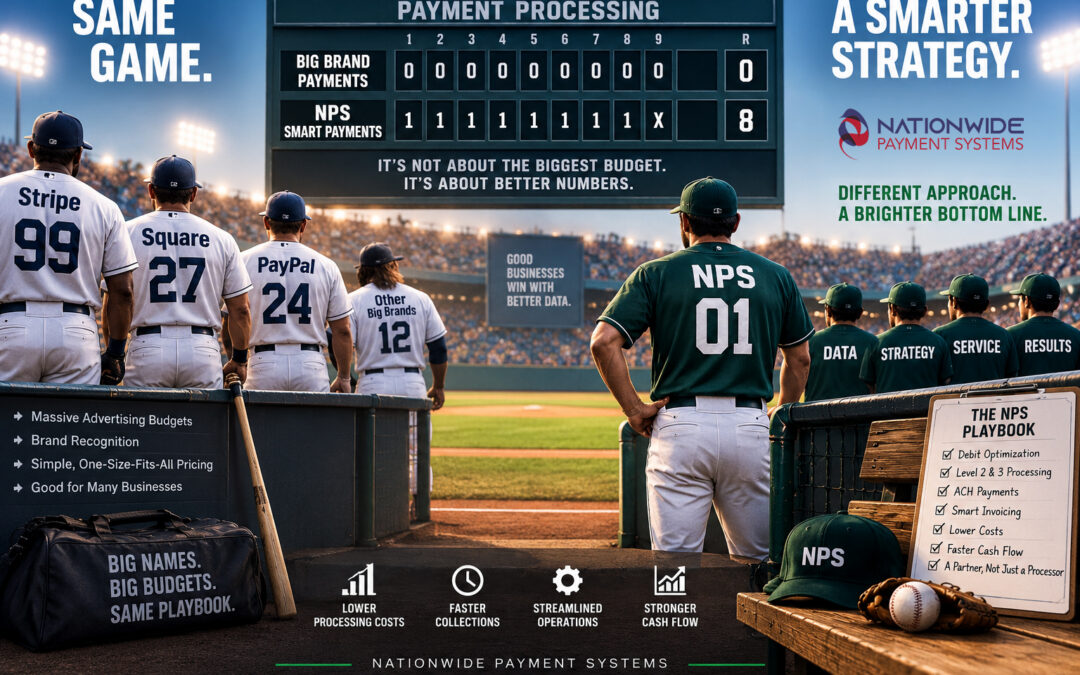
Businesses often choose a payment processor because the name is familiar, the setup is easy, or the advertised rate looks simple. Stripe, Square, PayPal, and other large platforms have built successful businesses around convenience and accessibility. For many merchants, those solutions can be a good fit.
But as a business grows, the question changes.
Are you choosing a payment processor because it is the most recognizable name—or because it delivers the best results for your business?
At Nationwide Payment Systems, we believe the answer should come from the numbers.
The Moneyball Problem: Paying for the Name Instead of the Results
In baseball, a famous player is not necessarily the player who delivers the most value for every dollar spent.
In payments, a recognizable brand is not necessarily the provider that delivers the best combination of cost, service, technology, and cash flow.
Consider a business that processes $250,000 per month in credit and debit card transactions. The owner may be comfortable with a flat-rate provider because the pricing is easy to understand. But has anyone reviewed the actual transaction mix?
How much of that volume is regulated debit? How much consists of commercial cards? Are there large B2B transactions that may qualify for Level 2 or Level 3 interchange programs? Could some customers pay by ACH? Are invoices being collected promptly, or is the business waiting 30, 45, or 60 days to get paid?
Those questions can reveal opportunities that are invisible when the only comparison is an advertised percentage.
The goal is not to find the cheapest processor on paper. It is to build a payment strategy that produces the best overall result.
The Advertised Rate Is Not the Scoreboard
One of the biggest mistakes businesses make is comparing payment processors using only the advertised rate.
A flat rate can be attractive because it simplifies pricing. But the actual cost of accepting payments depends on several factors, including card type, transaction size, payment method, processing environment, and the merchant’s pricing arrangement.
For example, a business processing mostly small consumer credit-card transactions may have a very different cost profile from a distributor accepting $20,000 commercial-card payments.
The same pricing model may not be optimal for both.
A proper payment review should examine:
-
Total monthly processing volume and fees
-
Effective processing rate
-
Average ticket and transaction count
-
Credit versus debit mix
-
Consumer versus commercial-card volume
-
Card-present versus card-not-present transactions
-
Eligibility for Level 2 and Level 3 data programs
-
ACH opportunities
-
Gateway, software, and other recurring costs
-
Settlement timing and accounts-receivable processes
This is the payment-processing equivalent of looking beyond batting average. The numbers that matter are the ones that contribute to the final outcome.
Finding the Undervalued Players in Your Payment Stack
The Oakland A’s looked for contributions that other teams were undervaluing. Businesses can do the same with their payment operations.
1. Debit Card Optimization
Debit transactions can have very different underlying costs from credit-card transactions. Depending on the card, issuer, transaction characteristics, and applicable interchange rules, there may be opportunities to improve pricing.
A business with significant debit volume should not automatically assume that one flat percentage is its best option.
2. Level 2 and Level 3 Data
B2B merchants may have opportunities to qualify eligible commercial-card transactions for more favorable interchange categories by submitting the required enhanced transaction data.
This can be particularly relevant for manufacturers, distributors, wholesalers, suppliers, and other companies processing large business-to-business payments.
Not every transaction qualifies, and the savings depend on the card, data requirements, and applicable network rules. But overlooking the opportunity altogether can be expensive.
3. ACH Payments
Not every payment needs to be made by credit card.
For certain B2B transactions, ACH can provide a cost-effective alternative, especially when customers are paying large invoices directly from their bank accounts.
The right approach is not to force every customer into ACH. It is to offer appropriate payment choices and understand the economics of each.
4. Smarter Invoicing and Collections
A business can negotiate a better processing rate and still have a cash-flow problem if customers take too long to pay.
Automated invoices, payment reminders, recurring billing, deposits, partial payments, and convenient payment links can help reduce manual collection work and encourage faster payment.
That is a different kind of value—one that may be just as important as reducing processing fees.
A Simple Example: Small Improvements Can Add Up
Imagine a company processing $500,000 per month.
After reviewing its payment mix, the company identifies opportunities that reduce its overall processing cost by an average of 0.30 percentage points.
That would represent approximately $1,500 per month, or $18,000 per year, in potential savings.
Now imagine the same company also improves its invoicing process and collects a meaningful portion of its receivables several days sooner.
The combined benefit could include lower payment costs, less administrative work, and improved access to working capital.
These are illustrative figures, not a savings guarantee. Actual results depend on the merchant’s transaction mix, current pricing, eligibility, and operating processes.
The point is that businesses should measure the entire payment operation—not just the rate printed on a pricing sheet.
NPS: A Different Way to Compete
Nationwide Payment Systems was founded in 2001, and I have worked in the payments industry since 1998.
We do not have the advertising budget of the largest payment companies. We are not trying to win by putting our name in front of every business owner in America.
Our approach is to understand the merchant’s business and identify the payment strategy that makes sense for that particular company.
That may involve interchange-plus pricing, debit optimization, Level 2 and Level 3 data, ACH, smart invoicing, recurring billing, or a more customized gateway integration.
It may also involve something that is often overlooked in a purely price-driven comparison: access to knowledgeable people who can help when a business has a problem.
A payment processor should not simply be a vendor that collects fees. It should be a partner that understands how payments affect the business.
Build the Right Roster with NPSONE
In Moneyball, the goal was not to find one superstar who could solve every problem. It was to assemble a roster that worked together.
A modern payment stack should work the same way.
For some businesses, a basic terminal or virtual terminal is enough. Others need a more complete system that connects payments to accounting, invoicing, e-commerce, or custom software.
NPSONE, Nationwide Payment Systems’ payment gateway and platform, gives businesses access to a range of payment capabilities, including Smart Invoicing.
Businesses can use Smart Invoicing as a standalone solution or connect it with supported accounting platforms such as QuickBooks Online, Xero, and Sage Intacct.
Depending on the configuration, businesses can offer credit-card and ACH payments, send invoices and payment links, automate recurring billing, and streamline collection workflows.
For software companies and ISVs, NPSONE also offers API and integration opportunities to build payment functionality into their own applications.
The objective is to create a payment stack that fits the business—not force the business to fit a one-size-fits-all payment stack.
Cash Flow Is the Real Scoreboard
Processing fees matter, but they are only one part of the equation.
A company that invoices $1 million per month and waits 45 days to collect has a very different cash-flow position from one that collects in 15 days.
That difference affects payroll, inventory, purchasing, expansion, and the ability to take advantage of new opportunities.
Business owners should not have to act as the bank for their customers when better payment and collection tools are available.
Smart invoicing can help by making it easier for customers to pay, automating follow-up, and giving businesses more control over their accounts receivable.
The time value of money matters. Getting paid sooner can be more valuable than many businesses realize.
Explore our Cash Flow Calculator to see how faster collections could affect your business.
When Flat-Rate Processing Makes Sense
Moneyball is not about assuming that every expensive player is a bad player. It is about understanding value.
The same applies to payment processing.
Flat-rate providers can be a good choice for startups, low-volume merchants, and businesses that prioritize quick setup and straightforward pricing. Stripe also offers custom pricing for businesses with larger volumes or unique requirements, so it would be inaccurate to assume every Stripe merchant pays the same standard rate.
The question is whether the current arrangement remains the best fit as the business grows.
A company processing $5,000 per month may have very different priorities from a company processing $500,000 or $5 million per month.
At higher volumes, even relatively small differences in effective cost can become meaningful. That is when a detailed review becomes especially valuable.
What Business Owners Should Ask Their Payment Processor
Instead of asking only, “What is your rate?” ask questions that reveal how the payment strategy actually works.
-
What is my current effective rate?
-
How much of my volume is debit?
-
Are my commercial-card transactions being optimized where eligible?
-
Could ACH reduce costs on certain invoices?
-
Are there opportunities to automate billing and collections?
-
What fees am I paying beyond the advertised rate?
-
Can my payment system integrate with my accounting software or ERP?
-
Who do I call when something goes wrong?
Those questions help move the conversation from selling a payment account to improving business performance.
You Do Not Have to Outspend the Competition to Win
The lesson of Moneyball is that smaller organizations can compete when they challenge assumptions, understand the numbers, and find value that others overlook.
That is how we approach payment processing at Nationwide Payment Systems.
We may not have the biggest advertising budget, but we can take the time to understand a merchant’s business, review the actual costs, and identify opportunities that a one-size-fits-all approach may miss.
For some businesses, the current processor may already be a good fit. For others, a review may uncover meaningful opportunities to reduce costs, improve cash flow, or simplify operations.
The only way to know is to look at the numbers.
You do not have to outspend the competition to win. You have to understand the numbers better.
Ready to Find the Overlooked Value in Your Payments?
If your business processes $30,000–$50,000 or more per month, it may be time for a closer look at your payment strategy.
Nationwide Payment Systems can review your processing statement, transaction mix, and current payment workflow to identify potential opportunities for improvement.
Whether you are using Stripe, Square, another processor, or an existing merchant account, the goal is simple: determine whether your current setup is delivering the best value for your business.
Schedule a payment strategy review with Nationwide Payment Systems.